| Digital
Camcorders - Hard Disk Drive (HDD)
Hard disk drive based camcorders (JVC in 2005, Sony and Toshiba in 2006) with capacities of 20, 30 and 60GB. No
tape and no disc - these camcorders use internal hard disk to capture video.
The JVC GZ-MG30 has a built-in 30GB hard-drive that is
capable of recording up to 37 hours of video in a palm-sized, lightweight (14
ounce) digital-camcorder. You don't need to use replaceable tapes or discs.
Instead, you can transfer images to other Audio/Video devices at home (VCR,
DVD) through composite
and S-Video ports or to your computer through the USB 2.0 high-speed
interface.
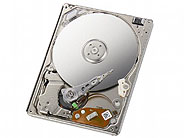
If you can fit a 60 GB hard disk into an Apple iPod portable
music player, then you should be able to fit one into a
camcorder. JVC was first to market with this disk-based approach, with
the JVC Everio digital media cameras, with palm-size form
factors and weighing under 14 ounces. The JVC Everios
are small and light because they get rid of the bulky
camcorder tape transport and replace it with a small hard drive.
The initial C Series products were released in
October 2004, and use a removable 4 GB Microdrive
Compact-Flash card
for storage (along with a Secure-Digital card for images). The G
series, introduced in August 2005, upgrades to
built-in 20 GB and 30 GB hard disks. Sony
introduced a 60 GB model.
JVC - C Series
JVC was the first company to market a consumer
level camera which did not use tape or even DVD
to record video but used instead a 4GB
Microdrive, which is a mini hard disk drive
originally designed by IBM. Movies
are saved in MPEG-2 format and you can store a full hour
of high quality video on the disk. Other features include
a 10X optical zoom lens, full manual controls, SD memory
card slot (in addition to the CompactFlash slot used by
the Microdrive), pop-up flash, and unique swivel body.
With a price of over $1,500.00 at launch, this was not the best value for the average consumer. The dimensions of
the GZ-MC500 are just 3.2 x 2.2 x 4.7 inches (W x H x D)
and it weighs just 11.7 ounces (330 grams). That's smaller
and lighter than your typical tape or DVD-based camcorder.

JVC's Everio GZ-MC500, which relies on MicroDrives for storage and has
three separate CCD sensors at 1.3 Megapixel each.
The initial JVC Everio C Series products were released in October 2004,
and use a removable 4 GB Microdrive CompactFlash (CF) card for video storage,
along with a SD card for images. The new Everio G series, introduced in August 2005,
upgrades to use built-in 20 and 30 GB hard disks.
JVC's hard drive based camcorder, the Everio GZ-MC500,
sporting 3 CCDs and 4 GB of storage
is similar to the single-CCD Everio camcorders launched in the fall of 2004. The
GZ-MC500 is capable of recording up to 60 minutes of DVD-resolution video at
720 x 576 pixels onto a 4 GB Microdrive. New as of the 2005 model is the three
separate 1.33 Megapixel CCD imaging censors, catering separately to red, green
and blue colors. In addition to video, the GZ-MC500 also combines and
interpolates data from all three sensors to achieve pictures with resolutions
up to 2560 x 1920 pixels, or 5.1 Megapixels.
According to JVC, this approach results in several
benefits over previous models, including sharper and more vivid colors. A 10x
optical zoom (8x for stills) JVC lens comes in handy for close-ups, and shoots
video in native 4:3 or 16:9 formats.
At its highest quality mode, the GZ-MC500 records at a fixed data rate of 8.88
Mbps including Dolby Digital audio (8.5 Mbps video plus 384 Kbps Dolby Digital
Audio) at 50i FPS and a resolution of 720 x 576, which is comparable to DVD
quality video. At this setting, JVC lists the GZ-MC500 as capable of storing up
to one hour of video on a 4 GB MicroDrive, which can easily be exchanged. If
you prefer quantity over quality, the GZ-MC500 can also muster a lowest
setting of 30p FPS, a data rate of 1.5 Mbps and resolution of 352 x 240 pixels,
which should allow for up to 5 hours of video.
Due to its use of hard drives as the storage medium of choice, the GZ-MC500
is also equipped with a floating suspension system to dampen vibrations through
polymer shock absorbers that automatically engage when the disk is
writing/reading and disengage to allow disk ejection/loading. The GZ-MC500
supports the USB 2.0 High Speed standard for high speed
data transfer to your Mac or PC. The 1.8 inch LCD has
130,000 pixels. There is no viewfinder.
What's in the Box
- JVC GZ-MC500 Digital Media Camera
- 4GB Hitachi Microdrive with
protective case
- BN-VM200 lithium-ion battery
- AC Adapter / battery charger
- USB cable
- A/V + S-Video cable
- Audio extension cable (for
optional headphones)
- Lens cap w/strap
- Lens hood
- Wrist strap
- CD-ROMs with Digital Photo
Navigator, PowerDVD 5, Power Director Express, and
PowerProducer 2 Gold (for Windows OS)
- 63 page camera manual + separate
software installation manual
JVC - G Series
In May 2005, JVC introduced four hard disk based camcorders, the GZ-MG20,
GZ-MG30, GZ-MG40, and GZ-MG50. The camcorders record video to internal hard
drives. The GZ-MG20 and GZ-MG40 have a 20GB internal hard drive while the
GZ-MG30 and GZ-MG50 have 30GB internal hard drives. The camcorders include
1.8" hard drives, manufactured by Hitachi.
Each is truly palm-sized and weighs less than 14 oz.
with the battery attached. Their design is similar to a
MiniDV camcorder's, which means that they're
comfortable to hold and operate, and include a large,
2.5-inch flip-out LCD monitor for easy recording.
Playback is easy, too, with multiple connections
allowing convenient TV playback, dubbing to a VCR or DVD
recorder, transfer to a PC or Apple Macintosh for DVD
creation, editing, or posting on the internet, or even
burned directly without a PC to a full length movie DVD
disc using an optional DVD burner.
MPEG-2 Video Recording for DVD-Movie Quality Footage
Because of the hard drive
mechanism the camcorders are very small and lightweight (14 oz.).
These internal Hard Drive-based camcorders are the third generation of JVC's
Everio camcorders. The first two
models recorded onto a removable Microdrive. Then JVC introduced a
higher-end 3 CCD Everio camcorder. These internal Hard Drive-based
camcorders increase the storage capacity greatly, as the earlier JVC
Everio models included 4 GB Microdrives. However, unlike the earlier Everios,
the media in these camcorders is not removable. While the
models do include an SD card slot, providing some removable and expandable
storage, the internal hard drives are fixed.
Each model includes a 2.5 inch LCD screen, a USB 2.0
jack for connecting the camcorder to a computer for
transferring video, an S-Video jack, and a composite
RCA video out jack. The camcorders include manual
control of white balance, shutter speed, aperture, focus
and some gain control.
The GZ-MG20 launched at $800, while the GZ-MG30 and
GZ-MG40 were $900, and the GZ-MG50 was $1,000. All four
models were available in August 2005. JVC has since
introduced more models including the newer GZ-MG70.
For
2006, the GZ-MG77, along with the GZ-MG37, GZ-MG27 and
GZ-MG21 include enhanced features such as the LCD mounted
4-way mini-joystick for control.
The Everio G series JVC GZ-MG50 and JVC GZ-MG30 offer over
seven hours storage at 9 Mbps, which is close to the
maximum bit rate for DVD movie quality recording, or 10.5
hours at 6 Mbps, comparable to DVD Cam recordings. Two
more modes are available for even more recording time. The
entry level JVC GZ-MG40 and JVC GZ-MG20 offer an
impressive 4.5 hours storage at 9 Mbps, and over seven
hours at 6 Mbps. Either way, the high quality MPEG-2
recordings are in the same format used in DVD so there
will be no quality loss when burning them to DVD, and no
time- and quality-wasting conversion.
JVC HDD Camcorder Shooting time (normal use)
|
Mode Setting
|
GZ-MG50 /GZ-MG30 |
GZ-MG40 / GZ-MG20 |
Bit rate Mbps* |
| Ultra (DVD Movie) |
7 hours |
4.5 hours |
9 |
| Fine (DVD) |
10.5 hours |
7 hours |
6 |
| Norm (TV) |
14 hours |
9 hours |
4.5 |
| Eco (Internet) |
37 hours |
25 hours |
1.7 |
*Combined A/V rates, Video Bit rate is fixed for Ultra and
Fine modes, variable for Norm and Eco modes.
JPEG Digital Still Camera Function
The JVC GZ-MG50 and JVC MG40 are equipped with 1.33
Megapixel CCD to allow digital still shooting at 1152 x
864, 1024 x 768, or 640 x 480 size. At each size, two
resolution modes are available: STD and FINE. Digital
stills or video can be stored on either the internal hard
drive or removable SD Memory Card (optional), whichever is
more convenient. The JVC GZ-MG30 and JVC MG20 offer
shooting of 640 x 480 digital stills. For quick downloading
to a PC, simply connect the camera via its USB 2.0
interface. All transfer is digital-to-digital (approx 4x
or better real time speed depending on PC), so there is no
quality lost in the process. And since the camera supports
PictBridge, it can be connected via the USB terminal to a
compatible printer to easily print stills directly from
the camera.
Make Full-length DVDs Easily, With or Without a
computer
In a unique collaboration with Apacer Technology Inc., JVC
and Apacer developed a new DVD video burner that connects
directly from the Everio G. Just select the playlist or
file, or simply copy it all, one touch creates a full
length video DVD to watch on a DVD player, with no need
for a personal computer.
For those who want to edit with a computer, JVC
includes software for use with both the Windows and
Macintosh platforms. Provided Pixela Capty MPEG Edit EX
and optional Capty DVD for making DVD Video software
provide seamless integration into the Apple Macintosh
computer world. Of course Everio G is compatible with
iPhoto for still pictures.
For Windows PCs, the CyberLink DVD Solution bundled
with Everio G models comprises three applications that
make it easy to make full-length DVD movies. A standard
4.7GB single-layer DVD-R/RW disc holds over one hour of an
Ultra mode movie, and over 90 minutes of a Fine mode
movie.
 |
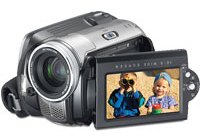 |
JVC Everio GZ-MG30
30 GB Hard Disk
Drive Camcorder
- 30 GB hard-drive camcorder; high-quality MPEG-2
recording
- F1.8 lens, 680K CCD, 25x optical zoom, 800x digital
zoom
|
JVC Everio
GZ-MG77
30 GB Hard Disk
Drive Camcorder
|
Random Access to Recordings
The benefits of recording video to a hard disk are the same benefits that have
made hard disk-based audio players so popular--random access to quickly locate
desired material, and the ability to effortlessly delete unwanted material and
easily rearrange the playback sequence. What's more, there's no danger of
mistakenly recording over something that's to be saved. Scene selection is
made easy thanks to on-screen index images, so the large amount recorded
won't become a hindrance to quick accessibility. And with remote control
operation, it is possible to connect the Everio G camcorder to a TV and operate
it from a distance, just like a DVD deck. Playlist operation allows recording
of desired clips directly to DVD with the optional DVD burner, or directly to
VHS or other analog input devices with the S-Video or Composite video output
for perfect copies every time.
Hard-Disk Protection and Stability
A challenge in designing and building a hard-disk camcorder is protecting the
disk from shocks and vibrations. One way this is done in the Everio G
camcorders is through a unique floating suspension system that effectively
dampens vibrations through advanced polymer shock absorbers. Another security
measure familiar to notebook PC users is its gravity-like force sensor system
that automatically senses sudden acceleration such as in a free fall situation,
and turns off the power to defend the hard disk so that a head crash can be
avoided in many cases even when the unit is dropped.
What's in the Box
Everio GZ-MG30, AC power adapter/battery charger, BN-VF707 rechargeable battery
pack, AV cable, USB cable, remote control, shoulder strap, grip belt, lens cap,
software CD-ROM (USB driver, Digital Photo Navigator: Windows, CyberLink DVD
Solution: Windows, PIXELA Capty MPEG Edit EX: Mac)
JVC's Everio camcorder now makes it easier to burn
videos straight from it's onboard hard drive thanks to
the Everio CU-VD10 Share Station. The Share Station is a
DVD burner designed specifically for use with JVC Everio G-Series camcorders. Connected via USB
2.0, the Everio Share Station will create a DVD that has
direct access to scenes, easy re-sequencing of scenes, and
instant scene deletion. Once connected, the camcorder
automatically identifies the DVD burner and is used to
control it with a menu that appears on the camcorder's
LCD, and with the push of a button, one hour of video
clips are burned to a blank DVD-R/RW disc in about 45
minutes.

The JVC CU-VD10 Everio Share Station.
SONY - HARD DISK DRIVE
CAMCORDER
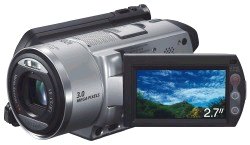
Jumping into the hard drive
camcorder market, Sony made a grand entry with the
3-Megapixel Handycam DCR-S100 capable of recording up to
seven hours of DVD quality video.
Offering up some serious competition for Sanyo and its
Xacti HD1 as well as JVC's line-up of Everio camcorders,
Sony introduced its first hard-drive based camcorder in
the Handycam DCR-S100. This camcorder is equipped with a 3 Megapixel CCD
sensor and 30 GB hard drive.
Built around a Carl Zeiss Vario-Sonnar T lens, the
Advanced HAD CCD sensor of the DCR-S100 allows for
recording in 16:9 and 4:3 aspect ratios. A 30 GB hard
drive complete with shock protection provides enough
storage for up to 7 hours of DVD quality recording or a
whopping 21 hours in long play mode, with audio being
delivered courtesy of built-in Dolby Digital 5.1 surround
sound. Also, the camcorder is compatible with a new,
optional center-channel Bluetooth microphone from Sony.
Users will be able to view their video on the built-in
2.7-inch swivel screen display, and also brighten their
recordings courtesy of a built-in flash. To come bundled
with DVD making software, the DCR-S100 incorporates a
dedicated direct-to-DVD button which fully automates the
process of creating a DVD through a one-button press.
Available May, 2006 the Sony Handycam DCR-S100 initially
retails in the $1,000 range.
The Sony DCR-SR80 houses a 60GB Hard Disk Drive (HDD) which stores up
to 40 hours of high-quality videos in standard 4:3 and 16:9 widescreen formats.
With 12x Optical/800x Digital Zoom and a Carl Zeiss Vario-Tessar Lens.
Plus, sharing everything you've captured with family, colleagues and friends
has never been easier with One Touch DVD Burn capabilities. You can burn
directly from the camcorder or the Handycam Station cradle. Additionally, you
can connect to a DVDirect burner to create DVDs without having to connect to a
PC.
Sony's unique DVDirect (DVD Direct) family of
multi-function DVD recorders can be used to record video
or even digital photos (MC1 only) directly to DVD -
without a computer. They can also be connected to a
computer for making copies of your DVDs and creating
advanced DVD projects.
The VRD-VC20 sports a unique vertical design - simply
connect your camcorder, VCR, even PVR to the recorder and
press the REC button on the front while starting playback
of the video. Press stop when you're done and you'll have
a DVD that can be played in a standard DVD player.
The VRD-MC1 allows recording both video from a
camcorder/VCR/PVR to DVD video as well as recording of
digital still pictures from your digital camera's memory
card as a slideshow DVD. The MC1 can even directly print
pictures from memory cards or DVD when connected to a
PictBridge compatible printer.
Built in color LCD screen
makes it a snap to preview video or digital pictures. The
new Sony DVDirect MC1 allows both video and digital
photos to be recorded to DVD without using a PC. The MC1
has video inputs on one side for direct connection of a
camcorder/VCR/PVR for easy direct recording of video to
DVD+R/+RW discs. The MC1 also has memory card slots for
the 5 popular camera memory cards and will directly record
images from the memory card to DVD-R/-RW as a DVD
slideshow. The Sony DVDirect VRD-MC3 model.

2006 SONY DCR-SR80 Hard Disk Drive Camcorder
The DCR-SR80, DCR-SR60 and DCR-SR40 hard drive models
have extraordinary recording times and eliminate the need
to manage removable media, such as tapes or discs.
The 60GB hard drive of the DCR-SR80 camcorder captures
up to 41 hours of video in long-play mode (3Mbps) or up to
14 hours of footage in high quality mode (9Mbps). The
DCR-SR60 and the DCR-SR40 models have comparable recording
times with 30GB -- up to 20 hours of footage in long play
mode and more than seven hours in high quality mode.
2007 SONY DCR-SR42, DCR-SR82 and DCR-SR200, DCR-SR300 HDD camcorders

Sony Handycam HDR-XR160
1920 x 1080 HD Recording
160GB Hard Disk Drive
Memory Stick Duo / SD Memory Card Slot
1/4" Exmor R CMOS Sensor
3.0" WIDE Clear Photo Touch Panel LCD
Built-in 160GB hard disk drive can record and store up to 54 hours of high definition video footage (HD LP mode).
The high-speed, built-in USB 2.0 cable allows for easy connection to your computer
for charging or file transfer without having to remember separate cables.
It also fits conveniently into the hand strap so it's out of the way until you need it.
Are the hard disk drives replaceable?
Yes, with some effort. Inside the camcorder, a ribbon cable attaches the drive to the camcorder.
To disassemble, remove the screws on the right side of the camcorder body to access the drive.
Remove the drive after detaching the ribbon cable. Note the orientation of the ribbon cable so a correct
install can be done with the new drive. Attach the ribbon cable to the new drive, oriented correctly and seated correctly.
Insert drive into place and screw in the small screws into camcorder body to reassemble.
Power on camcorder with a good battery. Open LCD screen to Menu
so the drive can be formatted. (All data will be deleted) Press "Media Format" (Hard Drive Selected) > HDD > Yes > Yes and the
drive should start formatting.
When completed, if errors, power off camcorder, remove battery. Wait a min. and install battery and power on.
Test recording.
Hard Disk Drive may even be replaceable with a solid state drive such as
KingSpec Yansen 128GB 1.8" ZIF 40-pin SSD
Digital Storage Capacity 128 GB
Hard Disk Interface ATA
Connectivity Technology IDE
Original: Sony HDR-SR11 2008 era 1080i 60GB HDD
TOSHIBA - HARD DISK DRIVE
CAMCORDER
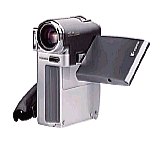
2006 Toshiba GSC-R60 Camcorder
Key Features of Toshiba 60GB HDD camcorder
- 60GB hard disc drive
- 2-megapixel CCD
- SD card slot
- USB 2.0 high-speed interface
- 2.5-inch diagonal TFT LCD monitor
- Electronic Image Stabilization
- Ethernet connection (on included cradle only)
Product Description
Records video to a built-in 60GB hard disk drive * 10X
optical zoom lens (digital zoom to 200X) * 2.12-megapixel
CCD (1.25 effective) * digital photo mode * 2-1/2"
LCD * widescreen (16:9) shooting mode * wind noise
reduction * auto and manual focus * audio/video output
(including S-video) * high-speed USB interface on included
cradle *
•
Which Camcorder Should I Buy?
• Digital Camcorders - Digital8
•
Digital Camcorders - MiniDV
•
MicroMV, solid state memory cards
•
Digital Camcorders - DVD
•
High-Definition Camcorders
•
Digital Camcorders - Hard Disk Drive (HDD)
•
Camcorder Connections and Accessories
•
Summary
|