Home
: Models
: Camcorder
Formats : Media
: Camcorder
Features
Camcorders
Introduction to Digital Camcorders and
the Digital8 format
Digital
Camcorders
Digital camcorders give you
greater ease and precision when searching for, titling,
and editing recordings. Multi-generation digital dubs
look identical to the original — clarity and color are
far superior to analog recordings. All digital cameras
offer A/V outputs that let you connect video from your
camcorder to your TV, DVD recorder or VCR, for copying
or playback. Most also offer A/V inputs — essential for
converting tapes from an older
format.
Digital8, MiniDV, 8cm
DVD, and hard-disk camcorders are almost at the top of
picture quality, delivering studio-quality video with
500 lines of resolution. The digital camcorders tend to
be smaller than analog models which makes them easier to
handle. The HDV format has even better resolution with
720p and 1080i making a HDTV purchase something to think
about.
Digital camcorders arrived in 1995 when
Sony and Panasonic introduced the first Mini
Digital Video (DV) format models and the cheapest was
$3,000. Since then, prices dropped over 90 percent! The
DV cassette (DVC) is 1/12th the size of a T-120 VHS
tape. Even more importantly, the camcorders record
digital video and sound, not analog like S-VHS-C and
High-band 8mm. Quality jumps to 500 lines of resolution
or more. You can record 16-bit digital audio, the same
as a CD or two 12-bit soundtracks.
Since the recorded
picture is digital there is no degradation when you make
duplicates for editing. Digital camcorders can
also connect to Personal Computers. Transfer of digital
photos and MPEG or M-JPEG movie clips is usually
accomplished via a USB connection. Full-motion digital
video is transferred to your PC by means of an i.LINK™
digital A/V jack, also called IEEE-1394; if your
PC doesn't have IEEE 1394, you may be able to use an
empty PCI slot to add a card.
Digital
cameras offer digital audio with both a 12-bit and a
16-bit format. Choosing 16-bit gives you CD-quality
stereo sound. Choosing 12-bit gives you one basic stereo
soundtrack while recording and lets you add another
stereo track later — great for adding voiceovers.
Most digital camcorders also let you save
digital photos to removable flash memory. Just
set the camcorder to photo mode. Take your photos and
then transfer the images to your PC for editing,
e-mailing, posting online, or printing.
Digital Camcorder Formats
•
Digital8 (D8) - Entry level for digital video,
compatible with 8mm analog.
• Digital Videocassette
(Mini DV) - Currently most popular.
• DVD-RAM - mini
DVD compatible only with dvd-ram capable equipment.
• DVD-R/RW - mini DVD with thumbnail index for quick
scene access.
• DVD+RW - mini DVD
• HDV -
High Definition video for HDTV
• MicroMV - super
small Sony format, now discontinued.
• Hard-disk -
stores video on built-in hard disk, download to
DVD.
• Solid-state -
stores video on memory chip.
Digital8 - In
March 1999, Sony introduced a camcorder which provided a
path for consumers to enter the digital era. Sony’s
Digital8 format is basically an 8mm camcorder with
digital circuitry. These camcorders let you record
digital video and sound on Hi8mm tapes but they play
analog 8mm and Hi8mm tapes as well. This format should
be considered by anyone replacing 8mm or Hi8mm
camcorders and is concerned about
price.
Sony Digital8® Handycam® Camcorder
with 2.5" LCD and Digital Still
Capability
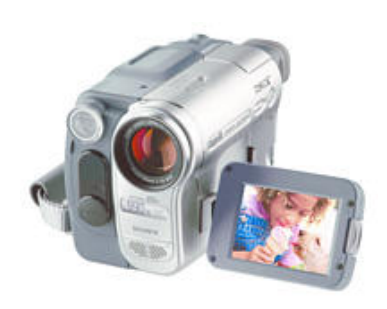
Sony DCR-TRV460
- Digital Still Memory Mode captures JPEG images at
640 x 480 resolution to Memory Stick (not included).
- NightShot 0 Lux infrared system with color mode
for recording in total darkness.
- 1/6" CCD Imager, 460K Pixels Gross.
- Black & White Viewfinder.
- Dimensions (WHD): 3 3⁄8" x 3 7⁄8" x 6" (85 x 98 x
151mm).
- Weight: 2 lbs. 0 oz (910g).
- Software OS Compatibility: Microsoft® Windows®
98SE, Me, 2000, XP Home and Pro; Macintosh® OS X
(10.1.5 or later).
What's included: Sony DCR-TRV460 Includes -
Sony DCR-TRV460 Digital 8 Handycam Camcorder, AC-L15
Power Adaptor/In Camera Charger, NP-FM30 InfoLithium®
Rechargeable Battery, Mono A/V Cable, Lens Cap, USB
Cable, Shoulder Strap, CD-ROM with USB Driver (Picture
Package™ Software Ver. 1.0 for Sony), RMT-831 Wireless
Remote Commander® Remote Control.
The Sony
Handycam DCR-TRV460 records in Digital8 format, a very
close cousin of DV. Though it can use inexpensive 8mm
and Hi8 tapes, it can't record in those older analog
formats. It can, however, play back analog tapes, making
it a prime choice if you want to upgrade to digital
quality and get additional features but don't want to
sacrifice your existing library of 8mm
video.
Backwards compatibility, and it has
a Memory Stick slot and 20X zoom. The record quality is
very good but the 1/6" CCD at 460,000 pixels is not as
good as a MiniDV with a 1/4" CCD at 680,000 pixels or
1/3" CCD at over 1 million pixels. You really need
something approaching 1 Mega-pixel in order to get
decent quality still pictures.
It has i.LINK (IEEE-1394
for connection to PC) and LCD touch-screen menus. You
can put the camcorder in 16:9 mode (wide-screen).
Connect to Sony DVD recorder (RDR-GX7 etc.) to make DVDs of
home videos. Record all your older tapes to DVD-R. The
TRV-460 converts analog to digital. The camcorder shoots
VGA-resolution stills and MPEG-1 videos and stores them
on Memory Stick cards. Sony includes a USB cable for
transferring pictures and videos from the Memory Stick;
this cable also lets the DCR-TRV460 double as a Webcam.
The built-in video light helps in darker situations, but
it illuminates objects just a few feet in front of the
camera; the Super NightShot infrared illumination is
similarly limited in range. The camcorder comes with a
rechargeable battery and built-in
speaker.
Digital8 camcorders are an affordable way to go digital, but
first-time buyers should opt for MiniDV as Sony will
phase out the D8 format long before MiniDV becomes
obsolete. If you owned an 8mm or Hi8mm camcorder,
Digital8 is a seamless way to go
digital.
For those who want to join the
digital majority, MiniDV is the choice to make.
DVD-based camcorders are starting to make inroads but
make sure your system is compatible before you buy. And
those home video makers who want a digital picture from
the smallest camcorders in the world, Panasonic's
SD-based and JVC's Microdrive-based models are worth
checking out. For those consumers who want the absolute
best and are willing to pay for it, the HDV
camcorders are the choice.
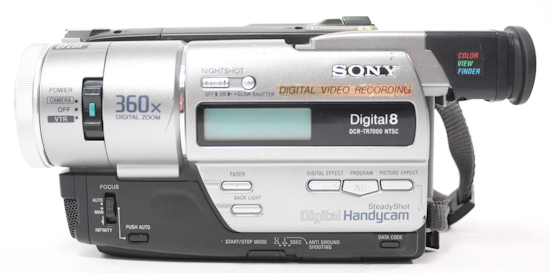
SONY DIGITAL8
CAMCORDER
Digital8 camcorders, such as the
Sony DCR-TRV460, use the same Hi8 tapes as analog but
the recording time is cut in half from 2 hrs. to 1 hr.
for digital. Some models offer a memory stick to store
digital still pictures.
Digital8
camcorders:
- Play tapes from your 8mm
or Hi8 library
- Are small and
lightweight, but not as compact as MiniDV
models
- Usually don't offer
top-of-the-line lenses
- Record on inexpensive
8mm or Hi8 tapes
- Offer a maximum record
time of 90 minutes in LP mode
• Which camcorder should I buy?
• Digital
Camcorders - Digital8
• Digital
Camcorders - MiniDV
• MicroMV,
solid state memory cards
• Digital
Camcorders - DVD
• High-Definition
Camcorders
• Digital
Camcorders - Hard Disk Drive (HDD)
• Camcorder
Connections and Accessories
• Summary
• Media
Capacity
• How to connect camcorder to TV, VCR, HDTV
• How to connect camcorder to PC
• Video Editors for PC and Mac
• Photo Gallery of camcorders
• Camcorder Buying Guide
Columbia ISA Audio Video
Empowering consumers through information
Copyright 2009-2026 All rights reserved
SWS
|