
|
|
|
There are five types of HDMI cables categorized by bandwidth and capability: • Standard (up to 1080i / 720p), 5Gbps • High Speed (1080p / 4K 30Hz), 10Gbps • Premium High Speed (4K 60Hz), 18Gbps • Ultra High Speed (4K 120Hz / 8K 60Hz), 48Gbps • Ultra96 (4K 240Hz / 8K 240Hz / 16K 60Hz), 96Gbps These cables can come with Ethernet functionality and use specific connector types. Type A (Standard and most common), Type C (Mini), or Type D (Micro) Most HDMI cables are passive, meaning one end goes into a source (Bluray Player) and the other end connects to an Audio Video Receiver or TV. The cable is also bi-directional, meaning you can connect either end to an HDMI input or output connection. Passive HDMI cables can typically provide a stable signal for lengths of up 15 feet. Active HDMI cables contain amplification circuitry inside one of the connectors. In most cases, power is provided internally, however, some active HDMI cables connect an external power source via a small cable that connects from one of the HDMI connector-ends to a USB power or AC adapter power source. Optical HDMI Cables transfer signals via fiber optic, in this case, both video and audio. Optical HDMI cables have the same types of connection ends as other HDMI cables. An optical HDMI cable can be made very thin. It can transfer stable signals over a longer distance than regular HDMI cables and without the need for external power. Active and Optical HDMI cables are directional (only one direction). This means one end is labeled "Source or 1" and the other end is labeled "TV or 2". The cable must be connected in the correct direction to work. How do I identify HDMI cables? Budget HDMI cables are often not labeled. If the cable is used (no package available) you cannot identify the cable by simply looking at it. Some HDMI cables may have identifying text along the cable length specifying the capabilities of the cable such as maximum speed. Licensed HDMI cables were created to establish a universal, high-quality standard, replacing a fragmented system of unknown cables. Licensing ensures all products meet strict performance specifications, helps to prevent counterfeiting (subpar cables), and enables secure content transmission. Licensing controls the use of the HDMI trademark and logo, ensuring consumers receive authentic products and protecting the brand's reputation for quality. Licensed HDMI cable manufacturers, often referred to as HDMI Adopters, produce cables certified by the HDMI Licensing Administrator, Inc. to ensure compliance with 18Gbps (Premium) or 48Gbps (Ultra High Speed) standards. Top brands include: Cable Matters: 48Gbps Ultra High Speed certified cables. Monoprice: Certified Ultra High Speed cables. Belkin: High quality certified HDMI cables. Zeskit: Highly regarded for their 8K certified 2.1 cables. UGREEN: Produces certified 8K/48Gbps HDMI 2.1 cables. Ruipro: Specialized in certified fiber optic HDMI cables. Highwings: Offers high-performance braided HDMI cables. Blue Jeans Cable: Known for high-quality certified cables. Licensed HDMI cables, specifically Ultra High Speed (HDMI 2.1) and Premium High Speed (HDMI 2.0), are certified by HDMI Licensing Administrator, Inc. to guarantee performance for high-bandwidth video, 4K/120Hz, 8K, and HDR. These cables undergo rigorous testing for EMI (electromagnetic interference) and feature unique packaging labels for verification. Buying a new certified HDMI cable from a known top brand retailer with the packaging, including the logo, QR code and holographic image is the best way to identify the HDMI cable. The official HDMI Cable Certification app, which used to be available on iOS and Android has been removed from app stores as of March 11, 2026. Previously used to scan 3D holograms on Ultra High Speed HDMI 2.1 cables, this app is no longer available, making app-based authentication for new HDMI cables difficult. This app was removed from app stores due to technical obsolescence, a lack of updates, and failure to function on modern operating systems. This app allowed users to scan 3D barcodes on HDMI 2.1 Ultra High Speed or Premium cable packaging. This app verifies, through a secure scan of the official holographic label, if the cable is certified, providing brand and length details to confirm authenticity and performance. Random elements in the hologram are recognized by the app giving each label a unique "fingerprint". Alternatives for HDMI Cable Verification: 1. Physical Label Check: Ensure the packaging has the official "Ultra High Speed HDMI" holographic label and QR code. 2. Buy from Reputable Brands: Buy directly from established brands such as Belkin, Cable Matters, Monoprice, or Zeskit. 3. Performance Testing: Test the cable with 4K@120Hz on HDMI 2.1-enabled devices like Sony PS5, Xbox Series X, or modern smart TVs to verify functionality. |
| HDMI Cable Type | Marketing Name | Resolution |
| Category 1 | Standard | 1080i 60 Hz 720p 60 Hz |
| Category 2 | High Speed | 1080p 60 Hz 4K 30 Hz |
| Category 2 | 4K HDMI Cable Premium High Speed | 4K 60 Hz |
| Category 3 | 8K HDMI Cable Ultra High Speed | 4K 120 Hz 8k 60 Hz |
| Category 4 | Ultra96 HDMI Cable Ultra96 - 96Gbps | 4K 240 Hz 8k 240 Hz |
HDMI cables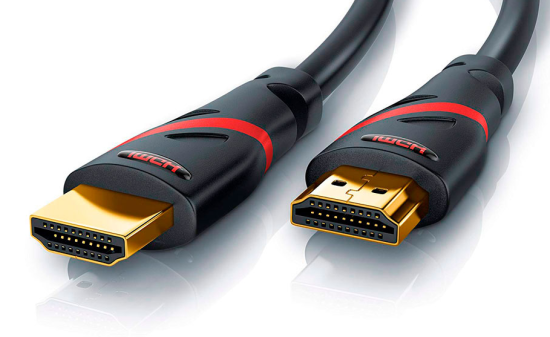  HDMI port HDMI has different connectors on the cables. Most are the 19 pin Type A on both ends. Camcorders can have the mini-HDMI connector, Type C on one end and Type A on the other end. Type A HDMI Type A connector has 19 pins, with bandwidth to support all SDTV and HDTV modes. Type B This connector has 29 pins and can carry double the video bandwidth of Type A, for use with very high-resolution future displays such as WQUXGA Type C A Mini connector defined in the HDMI 1.3 specification, it is intended for portable devices. It is smaller than the Type A plug connector but has the same 19-pin configuration. The Type C Mini connector can be connected to a Type A connector using a Type A-to-Type C cable. Type D A Micro connector defined in the HDMI 1.4 specification keeps the standard 19 pins of Types A and C but shrinks the connector size to something resembling a micro-USB connector. Cable length Although no maximum length for an HDMI cable is specified, signal attenuation dependent on the cable's construction quality and conducting materials limits usable lengths in practice. Cable category HDMI 1.3 defines two cable categories: Category 1-certified cables, which have been tested at 74.5 MHz (which would include resolutions such as 720p60 and 1080i60), and Category 2-certified cables, which have been tested at 340 MHz (which would include resolutions such as 1080p60 and 2160p30). Category 1 HDMI cables are to be marketed as "Standard" and Category 2 HDMI cables as "High Speed". The Ultra High Speed HDMI® Cable The latest home consumer HDMI Cable is the only cable that complies with stringent specifications designed to ensure support for all HDMI 2.1a features including uncompressed 8k@60 and 4K@120. The cable’s bandwidth supports up to 48Gbps, it is backwards compatible with existing HDMI devices, and features exceptionally low EMI which reduces interference with nearby wireless devices. For verification and authentication, the cable packaging is required to display the Ultra High Speed HDMI Certification Label which includes the Cable Name Logo printed on it. 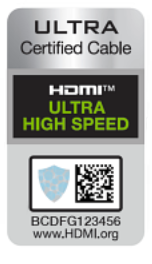 8K HDMI Cables 2.1 10FT 48Gbps 8K & 4K Ultra High Speed Cords(8K@60Hz 7680x4320, 4K@120Hz) eARC HDR10 HDCP 2.2 & 2.3 3D The Ultra96 HDMI cables are for high-end gaming and commercial use. What is HDMI with Ethernet? HDMI with Ethernet allows a device that's connected to an Ethernet network to share the connection with other components over an HDMI cable equipped with Ethernet capabilities. These cables can carry data between the connected devices. Installation is simplified because a single cable does the job of what previously required two cables. Perhaps the most common application for HDMI with Ethernet is for use with a gaming console. Instead of having to run two separate Ethernet cables, one to an internet-capable display and one to the gaming console, the connection is shared by the two components connected by the HDMI with Ethernet cable. Note that both of the devices in the installation must support HDMI with Ethernet for this to work. These devices will be labeled as HDMI Ethernet Channel (HEC) compatible. A high-speed HDMI with Ethernet cable will be backward compatible, future-proofing your installation for any new devices, even if your current setup lacks HEC capabilities. Audio Return Channel (ARC) and Enhanced Audio Return Channel (eARC) One of your TV's HDMI ports might be labeled ARC or eARC. Audio Return Channel (ARC) enables a TV to use the same cable transmitting the HDMI signal to the TV to “return” the audio signal to a sound bar or AV receiver. That means fewer cables in your setup and you can use your TV's remote to control volume levels. It also provides the ability to transmit Dolby TrueHD or DTS HD Master Audio to your sound bar or receiver. An HDMI cable that supports 4K resolutions will support ARC. Enhanced Audio Return Channel (eARC) is a feature of HDMI 2.1. It supports full-resolution audio signals, meaning it supports Dolby Atmos and other uncompressed sound formats. If your components support eARC, use a high-speed HDMI cable with Ethernet. • HDMI Versions • HDMI Fiber Optic Cables • HDMI switchbox Bluray • HDMI Background • Ethernet Cables Columbia ISA Audio Video Empowering consumers through information SWS |