|
DTV Converter Box Hook up to Older TV
TV sets with 300 ohm twin terminal antenna connections.
The Switch to Digital TV
 Television is changing!
ARE YOU READY?
• How to hookup digital converter box to older analog TV
Easy HDTV Hookup
Keep old TV
Are you one of the millions of American households getting your TV programs only from over-the-air local TV broadcasts?
If you have an analog TV that has a rabbit ears antenna or a roof-top antenna and you receive your TV programs only
by over the air broadcasts, you need to be aware of important changes since FEB 2009.
Almost all local TV stations are required by law to stop broadcasting in the 50 year old TV format (analog) and start
broadcasting in the new (digital) TV format on Feb. 17, 2009. What does this mean to you? It means you need to take
action before Feb 17, 2009 if you wish to continue to receive TV programs over the air. (Cable TV, Satellite TV and other pay
TV subscribers are NOT affected)
What do I need to do?
1.) Buy a digital to analog TV converter box for your current analog TV.
2.) Buy a new digital TV with a digital tuner built-in.
3.) Subscribe to pay TV services with your local cable TV company or satellite TV provider.
The least cost option is to get a converter box and continue to use your current analog TV. The U.S. Government will even
help you pay for the converter box. The converter box will allow you to receive the new digital TV broadcasts and convert
them to the old style signals so your old TV can display them. You even get some extras by installing the converter box.
Part of the law passed by the U.S. Congress creates a coupon program for households wishing to use their old analog TV
sets after the transition to digital TV. The Federal government is offering up to two $40 coupons to help pay for the converter boxes.
TVs connected to cable, satellite or other pay services do not need a converter box to receive programs after Feb 17, 2009.
A digital television (DTV) Converter Box is also known as a set top box. It is an electronic device that converts the free over-the-air
digital TV signal into an analog signal viewable on older "analog" television set. Most converter boxes are smaller than a VCR.
Some are about the size of a small book, about 8 inches wide by six inches deep by an inch or so high. So they don't take up very much space.
The converter box connects between your antenna and your TV set. They come with a remote control and you change
channels with this remote, not your TV remote.
The digital to analog set top box connects your antenna or rabbit ears thru the converter box and out to your TV set.
It will allow you to continue watching TV after February 17, 2009, the day the transition to "all digital" takes place.
There are some advantages that come with the converter box which many analog TV viewers have never experienced.
For example, with the converter box you can display on your TV screen such things as an electronic program guide.
The display describes the current TV show and may offer information on the upcoming TV show.
How to Hookup Digital Converter Box to Analog TV
Digital to 300 ohm Analog TV
Connecting the digital TV converter box to your older analog TV involves plugging in the antenna cable to the converter box input
jack for ANTENNA and connecting the converter box OUTPUT to your TV INPUT. If your TV is the type without
Audio/Video input jacks and only has a VHF 75 ohm RF input jack, then use a RG-59 or RG-6 coaxial cable to connect the
TV to the converter box. This cable is the same as those used in homes with cable TV or satellite TV. You will get only MONO
audio from a coaxial cable connection. If your TV is newer and has RCA audio/video input jacks (yellow, red, white) then you can
get stereo sound if your TV has stereo sound capability. Use a yellow RCA cable for video and the two (red and white) RCA cables for audio.
Use only the white RCA cable if your TV is not stereo sound capable.
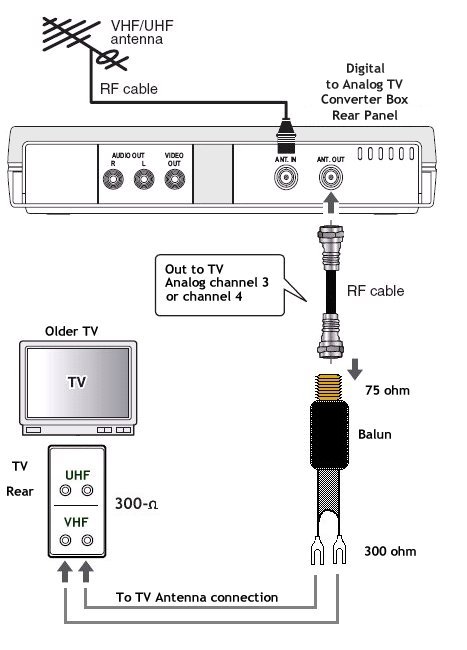
300 ohm twin terminal TV
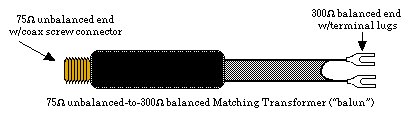
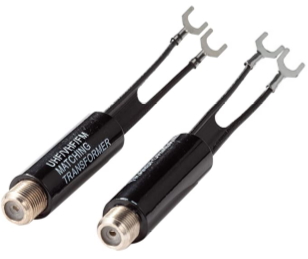
If your TV does not have RCA Audio/Video input jacks and does not have a 75 ohm RF input jack but only has 300 ohm twin terminals,
then you can use a BALUN to hook up your TV to the converter box. A BALUN takes the 75 ohm coaxial RF cable and converts to a 300 ohm
for a twin terminal connection on your TV set. These baluns are available online.

Balun to convert 75 ohm to 300 ohm
• How to setup converter box for the first time
• How to hook up converter box
• Cable Connections
- hookup
• How to connect DVD player
• See over 100 hookup diagrams
• How do I know a TV is a HDTV
• Things you should know about HDTV
• Setup HDTV
• Buying Guide for HDTV
• Converter box hookup
• What kind of TV do I have
• RF passthru for both analog and digital TV
Columbia ISA Audio Video
columbiaisa@yahoo.com
Empowering consumers through information
|