
|
|
| Diagram
Index Cut the cord - How to record TV with only an Antenna. Subscription-FREE DVR How do I record from my TV? You can record over-the-air broadcast TV programs on a VCR using a DTV converter box or you can invest in a DVR. DVRs are available from TIVO, SiliconDust, Tablo, and more. Cord cutters DVR to record FREE TV Free TV is local over the air TV using an antenna connected directly to your TV. You can get high definition TV, better resolution video than cable, from the networks such as CBS, NBC, ABC, FOX, and (Spanish) Telemundo and Univision. Cable and Satellite TV paid services With Cable and Satellite TV, you typically get a DVR to record TV shows. These boxes work with the providers sources and schedules/guides but you have to pay each month. So how do you record from just an antenna? You buy a DVR but only pay once just for the DVR itself. TABLO DVR device WATCH, PAUSE, RECORD, & REPLAY LIVE TV 4th Gen Tablo DVR: Tablo support - support@TabloTV.com or call 1-844-822-5688 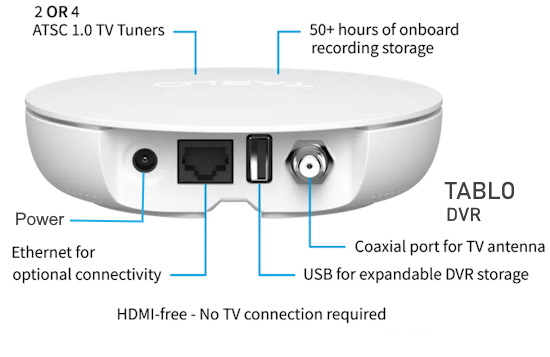 Recording Capacity: 50+ hours of onboard HD storage; Support for USB hard drives up to 8TB (~1000 hours of HD storage) Ports: Power; Ethernet 10/100; USB 2.0; Coax Processing: 1 GB RAM; 128 GB Flash Networking: 100 Mbps Ethernet; 802.11ac dual band WiFi with MIMO Dimensions and Weight: Height – 35 mm (1.37”); Width – 127 mm (5.00”); Depth – 127 mm (5.00”); Weight – 170 g (5.9 oz) Built-in Antenna Amplifier: 11dB gain per tuner; 75 Ohm impedance (input and output) – Can be turned off if using an external amplifier Video Format: MPEG2 (recordings saved to onboard storage will be transcoded to MPEG4 to maximize capacity) Audio Format: Pass-through of 5.1 Surround Sound when available Rolling 14 days of TV Guide Data, no subscription required No Subscriptions: Offers free channel guide data and features, eliminating monthly fees. Whole-Home Streaming: Connects to your home wireless router to send live TV to smart devices without needing a direct connection to every TV. Recording Capabilities: 2-tuner or 4-tuner options allow you to watch/record multiple shows at once. Built-in Storage: Includes 128GB of internal storage, with options to add external USB storage. Tablo App is required. Tablo is compatible with most smart TVs running the following operating systems: Roku Amazon Fire TV Android TV/Google TV Samsung TIZEN LG webOS Also, iOS and Android mobile devices, Apple TV, ROKU and Amazon streaming devices. Is the Tablo app compatible with my LG 43 inch smart TV? Yes, the 4th Generation Tablo app is compatible with most LG Smart TVs running webOS 4.5 or newer (manufactured 2019 or newer). You can download the native Tablo app directly from the LG Content Store to stream live TV. The app allows you to browse, record, and watch, but requires a 4th Gen Tablo device. Must be webOS 4.5 or higher. (A 2025 LG TV would have webOS 10.3 or higher) Download Location: Open the LG Content Store and search for "TABLO TV" to install. Installation Method: Locate the dark blue Tablo app, install it, and ensure your TV is on the same home network as your Tablo device. Older TVs: If your LG TV is from before 2019, you may need an external device like a Roku or Fire TV Stick. • Tablo TV 4th Gen 2-Tuner Over-The-Air (OTA) DVR - Watch, Pause & Record Live Television, News, Sports & Movies Throughout Your Home Over Wi-Fi 
• Tablo Quad TV Tuner For Over The Air - Cut The Cord - YouTube video Where do I get my program guide information for over-the-air TV broadcasts? PSIP or Program and System Information Protocol which can carry program guide information as well as channel mapping and other data for your TV. It is part of the digital TV broadcast standard ATSC. Your TV has an ATSC TV tuner built in and can interpret this information. Tablo devices primarily get their TV guide data from the internet via a Tablo TV service (specifically, Gracenote), not from PSIP over-the-air signals. An active internet connection is required to download 14 days of schedule data and to facilitate accurate scheduling of series recordings. Record two shows while viewing a third. The DVR can record two TV channels while you view another channel on the TV. A signal splitter is used to send over the air TV shows to the DVR and the TV.  Diagram - Antenna split to DVR to record and TV to view Recording TV from antenna to VCR or DVD Recorder Local over-the-air TV signals are received by an antenna connected to a Digital to Analog Converter Box. If you want to record to a VCR or DVD recorder, connect the yellow, white, red RCA cables to the matching RCA inputs of the VCR or DVD recorder. Then connect the outputs of the VCR or DVD recorder to the TV.  Connect TV antenna to DTV box and DTV box to VCR and VCR to TV.  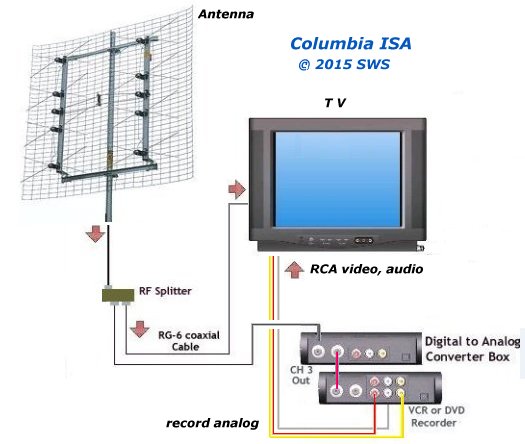 Diagram - connect antenna through splitter to DTV box to VCR for recording and viewing View one channel on TV while recording another on VCR. Playback to TV using RCA inputs. Use tuner in TV for viewing while using tuner in digital to analog TV converter to send audio/video to VCR or DVD recorder.  • VCR Recording DTV converter o How to connect HDTV with only optical audio output to stereo See more... • Surround Sound over HDMI • How to hookup surround sound • Surround Sound Glossary • How to add great sound to HDTV - Sound Bar • Surround Sound Speaker Hookup • A/V Receivers Guide • Cable hookup digital cable and TV • Audio Video Connections • HDMI Versions • HDTV hookup options Columbia ISA Audio/Video Empowering consumers through information. Contact: columbiaisa@yahoo.com SWS |