
|
|
|
BLU-RAY DISC • DVD • VCR 
Blu-ray optical disc The physical media Bluray disc can provide better video and audio than the compressed streaming content delivered over internet. In addition, you do not need to rely on an internet connection which can sometimes be unavailable or intermittent. • Bluray Basics • Audio Video Connections • HDTV Basic Setup BLU-RAY REVIEW Blu-ray Disc (BD) is an optical disc storage medium designed to eventually replace the DVD. The name Blu-ray Disc refers to the "blue laser" used to read the disc, which allows for six times more storage than on a DVD. While a DVD uses a 650-nanometer red laser, Blu-ray Disc uses a 405 nm "blue" laser. This shorter wavelength allows for over five times more data storage per layer than allowed by a DVD. High Definition video such as 1080p or 4K requires more storage for a full length movie so Blu-ray Disc allows for this space whereas DVD does not. Blu-ray Disc is like DVD, only better. A single layer Blu-ray Disc can hold 5 DVDs. The video is better than DVD and the audio can be much better, including the latest surround sound, giving the customer a much richer movie experience. Blu-ray Disc can deliver 1080p or 4K video, even better than broadcast TV. Many players are now 3-D capable, although you should make sure your TV is compatible with the player. Many Bluray players now require firmware updates to function properly. Load times have improved and many players are internet capable. Check compatibility and additional requirements always. Internet media access depends on many factors. Performance also depends on many factors. You do not need internet connectivity to just view Blu-ray movies. Movies from the internet on your Blu-ray Player Why go to the store to buy a movie? Now you can get movies directly to your home using a Blu-ray player and high-speed internet service. See Streaming Video for more details. If you want to access internet media from, say Netflix, you need broadband internet service and a router for wired or wireless access. Modern Bluray players often have a built-in wireless capability and also a wired Ethernet port. Depending on your particular setup, you may need to configure the player and the router in order to access the internet. In addition, you will need accounts active at such services as Netflix and pay their charges in addition to internet service providers monthly charges. Bluray players will also play your DVD collection and in many cases, upscale the video quality. Stand-alone Blu-ray players are not the only way to view Blu-ray movies. You could also consider a Home Theater In-a-box setup. These units have a blu-ray player and also the loudspeakers for surround sound. They will not give you the full performance of an Audio/Video Receiver and larger speakers but some like them for several reasons such as smaller size and cost. Samsung, Sony, Panasonic, LG and others all offer these systems. Blu-ray Players 4K or UHD Blu-ray Players can play UHD Blu-ray movies or 1080p movies or DVD or CD. The 1080p HD players cannot play 4K movies. 4K UHD players: Panasonic and Sony dominate the UHD player market with Panasonic being at the top. Best 4K Bluray Player  Panasonic Streaming 4K Blu Ray Player with Dolby Vision and HDR10+ Ultra HD Premium Video Playback, Hi-Res Audio, Voice Assist - model DP - UB820 2 HDMI outputs (Video/Audio and Audio only), 7.1 RCA analog out, 4K Streaming, optical audio output, Ethernet connection, Wi-Fi (WiFi-5) Panasonic Premium 4K Blu Ray Player, UHD DVD Blu Ray Player with Hi-Res Sound, 4K VOD Streaming, HDR10+ and Dolby Vision 
Sony UBP-X700M 4K Ultra HD Home Theater Streaming Blu-ray DVD Player with Wi-Fi, 4K upscaling, HDR10, Hi Res Audio, Dolby Digital TrueHD/DTS, Dolby Vision  The Samsung BD-C5500 is a basic, entry-level player designed for consumers looking for Blu-ray Disc playback, but who aren't interested in Samsung's "Internet@TV" apps, available on step-up models. In addition to Samsung's typical Blu-ray video capabilities, the BD-C5500 sports reduced power consumption and it's Wi-Fi -ready when paired with an optional USB dongle. Moving up to the BD-C6500 gets you access to Internet@TV. Web applications available through Internet@TV now include Netflix, Blockbuster, Picasa, Pandora, VUDU, Twitter and more. Also notable on the 6500 is a reported 15-second boot time and 15-second disc load time. For consumers looking to make a fashion statement with their Blu-ray Disc player, Samsung offers the BD-C7500. Touted as the world's slimmest Blu-ray player, the 7500 measures a mere 1.1 inch in thickness. And if that weren't enough, the unit features a "nature-inspired wood design coated with jewel-like gloss." Like the 6500, the 7500 features built-in Wi-Fi support and access to Samsung's Internet@TV suite. Last but not least we have the 3D-capable BD-C6900. This Blu-ray Disc player, when paired with a 3D-capable HDTV and 3D glasses, will allow you to enjoy upcoming 3D Blu-ray Discs. The Samsung BD-C6900 has excellent Blu-ray performance and is loaded with features, but you pay a lot for the 3D functionality. 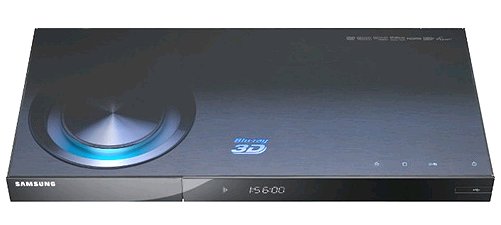
Price: $200 - $300. Key Features * 3D-Capable Blu-ray player * Supports Internet@TV/Samsung Apps, which will provide content from Netflix, Pandora, Vudu, Blockbuster, Picasa, and Twitter * Fast disc load * Built-in Wi-Fi * EnergyStar? 4.0 Compliant Specifications * Full HD 1080p/24 * Playback Media : 3D Blu-Ray Disc, BD-R, BD-RE, DVD-V, DVD-R, DVD-RW, CD, CD-R, CD-RW, WMA, MP3, JPEG * Built-in Audio Decoders : Dolby TrueHD, Dolby Digital, DTS- HD decoder, Dolby Digital Plus * BD profile : BD-Live (2.0) * DVD Upconversion : Yes (up to 1080p) * Output Resolution : 720p, 1080i, 1080p * 1GB Media Storage * Dimensions: 16.9"W x 1.6"H x 7.9"D * Weight : 4 lbs Connectivity * Composite Video Outputs : 1 * Component Video Outputs : 1 * HDMI Outputs :1 (Version 1.4) * Optical Digital Audio Outputs : Yes * Coaxial Digital Audio Outputs : Yes * Analog Audio Outputs : Stereo & 7.1 Ch * Ethernet Port x 1 * USB Port x 1 (Front) • BLU-RAY BASICS - Learn about Bluray The Sony BDP-S570 has all the features of other midrange Blu-ray players, plus future 3D support and best-in-class operational speed. * BRAVIA Internet Video: Access movies, music, videos & more * Built-in Wi-Fi & Blu-ray 3D playback capability * iPhone/iPod touch BD Remote * Quick Start/Load to watch movies faster than ever * DLNA wireless streaming of photos, videos and music  The LG BD550, LG BD590 Blu-ray Players 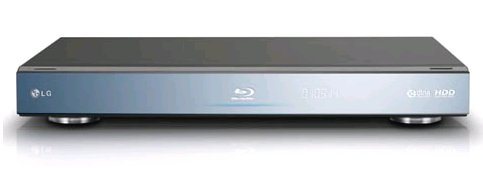 LG Bluray player BD590 has flip-down front panel for access to the USB port. Much better than the Samsung or Sony players USB access. Plus it has a hard disk. LG - all its Blu-ray players support access to Netflix, CinemaNow, VUDU, YouTube and Pandora. LG BD550 * Full HD 1080p Blu-ray Disc playback * 1080p upscaling of standard DVDs for better picture quality * Dolby TrueHD and dts-HD Advanced Digital Out technologies for a more immersive audio experience * USB 2.0 Media Host to display photos, play videos and listen to MP3 files. LG BD590 * BonusView * BD-Live * Full HD 1080p Blu-ray Disc playback * 1080p upscaling of standard DVDs * Dolby TrueHD and DTS-HD Advanced Digital Out * USB 2.0 Media Host to display photos, play videos and listen to MP3 files * Wi-Fi connectivity * 250-GB hard drive * NetCast Entertainment Access: allows instant access to Netflix, CinemaNow, VUDU (with the option to stream or store movies directly on the hard drive), YouTube and Pandora. New content partners for 2010 include the Picasa photo service and forecasts from AccuWeather. * DLNA functionality * MusicID-Stream (from Gracenote): allows consumers to hear a song playing in a movie or TV show by simply pressing a button on their remote control. Gracenote then returns rich information on the song, such as artist and genre, along with album cover art. Photos or personal videos that may have been scattered throughout the home on PCs or digital cameras can now be simply imported via the USB or Ethernet port to create a single organized library of personal memories.
Panasonic Bluray Player DMP-BD65 For under $100, this player can allow you to view movies and internet content. It has a USB port, HDMI output, can play CDs and DVDs and has an SD memory card slot. 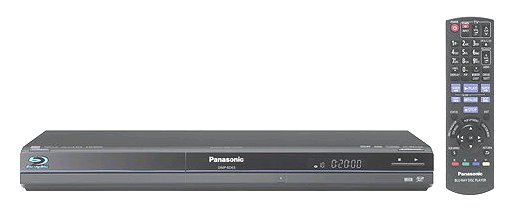
Panasonic's DMP-BD85K has great image quality and its 7.1 analog outputs are a nice plus, but it's slow and less featured than competing models. Start watching your favorite high-definition movies almost instantly with the Panasonic DMP-BD85 Blu-ray Disc player, which features an ultra-fast 2-second boot time. You'll also enjoy BD-Live and Panasonic's VIERA Cast functionality for accessing Internet video content thanks to the included Wi-Fi connectivity (via included Wireless LAN adapter) as well as wired Ethernet networking. It also includes both a USB port and a Secure Digital (SD) memory card slot, making it easy for you to view and share both digital still images and HD video recorded with an HD camcorder in the AVCHD format (DivX movie format also supported). Other features include compatibility with a wide variety of disc formats (including standard DVD movie discs), HDMI Jitter Purifier, 7.1-channel audio decode analog output, Energy Star certification, and Panasonic's VIERA Link function--allowing you to operate multiple audio/video components using a single remote via HDMI. DVD - Video and Audio on an optical disc  • How to hookup DVD to TV VCR - Video and Audio on magnetic tape  • VCR Basics • VCR hookup diagrams • VCR connect to flat screen TV • VCR to cable box hookup • VCR to PC hookup • VCR head cleaning SEE ALSO - • How to hook up a Plasma or LCD HDTV • How to hook up a Cable TV box • Cable TV - Cable Box Setup • How to Install a HD Cable Box • Cable TV - Cable Box Setup Scientific Atlanta 4250HDC • Surround Sound over HDMI • Surround Sound - How to Hookup • HDTV Antennas and Reviews • HDTV BUYING GUIDE in 9 EASY STEPS • HDTVs for under $500 • Samsung HDTV Fall 2009 • See over 100 hookup diagrams • Bluray Players, internet-enabled, Netflix movie streaming • Cable Types, audio/video for TV, explanation • Hookup diagrams, TV, VCR, DVD, Digital cable box • DVD Players reviews and Guide • How to Hookup an Audio Video Receiver • How to buy a wireless router • Home Routers - networks - setup • Streaming video 2011 • ROKU Player setup • Wall Mounting HDTV - Companies, mounts • How to upgrade SAMSUNG HDTV firmware FAQ Question: See also: • PC stereo hookup • VCR Recording • see over 100 Hookup Diagrams • Audio Video Connections • See over 100 Hookup Diagrams DVD • VCR Guide • Timer Record radio shows on a VCR Listen to radio on your own schedule • How to install a PCI card in your computer HDTV • HDTV Cable Diagrams • HDTV Hookup • More HDTV FAQ • How do I know a TV is a HDTV? • Things you should know about HDTV • How to wall mount Plasma or LCD HDTV • How to hook up Plasma or LCD HDTV • HDTV Basic Setup Audio Video Cable Hookups • Audio Video Connections • See over 100 hookup diagrams • Connection Diagrams • USB • PC to stereo hookup • Connecting PC to stereo components • Nintendo Wii hookup • Surround Sound • Audio and Video Cables • Blu-ray Surround Sound • Blu-ray Basics, players, Netflix • Blu-ray BD-LIVE • Blu-ray and HDTV • Blu-ray Player Sony BDP-S560 • Blu-ray Player Sony BDP-N460 • Video cable connections • Camcorder Formats • Camcorder - How to choose • Hookup diagram hdmi bluray • 100 hookup diagrams • DVD connect • DVD FAQ • Diagram RF Modulator • Surround Sound Glossary • How to hookup surround sound • Surround sound over HDMI • Hookup TV DVD VCR • TV introduction • VCR basics © Columbia ISA Audio/Video SWS |